Some interesting stuff that i stumble upon and i think it is going to be an interesting thing to read https://blog.cleancoder.com/uncle-bob/2012/08/13/the-clean-architecture.html
This is the best resource i found to setup airflow using docker-compose. You need a more recent version of the docker compose. Create a file called docker-compose.yaml with content take from here . Then run the following command :- docker-compose up airflow-init next, run the following command. docker-compose up
When you create your environment and add some vm into your Azure DevOps, you might find yourself trying to deploy to vm with multiple tags. Here is how you do it :- Here we are specifying that the deployment goes to target server with tag web1 and web2 jobs: - deployment: VMDeploy displayName: web environment: name: VMenv resourceType: VirtualMachine tags: ' web1, web2' strategy:
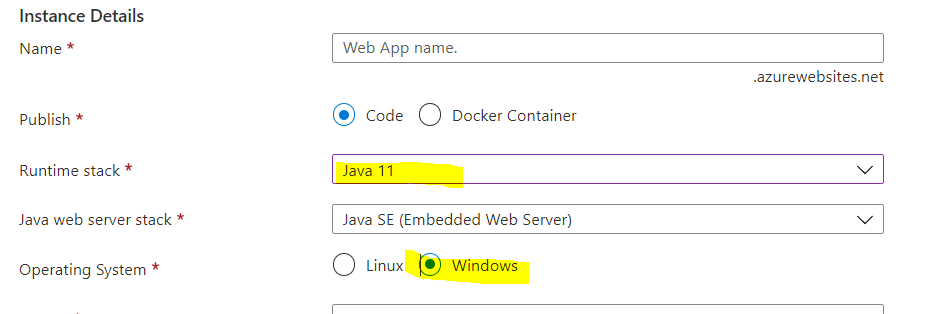
Please note this only tested with sonarqube 8.4 and if this is version you're working with please read on. Tried with sonarqube 8.6 with this setup and no luck :( Setting up App service First we need to setup our web app service. The requirement are it requires JDK 11 (that's because of the sonarqube version that i'm using) and must be a Windows. The start up scrip that we are using requires that. Create an instance of this application and continue below. Copy sonarqube binaries and startup files over After that, use FTP tool to copy some files over to wwwroot. This FTP credentials can be obtained from Deployment center as shown below: Please download sonarqube from here . I am using version 8.4, developer version. Unpack it into a folder called sonar. Your folder should look something like this. We have web.config, HttpPlatformHandlerStartup.ps1 and the unzip sonarqube binaries. Copy all EXCEPT sonarqube-developer-8.4.135646 to app servi...
Sometimes it can be pretty daunting, trying to get the correct manual intervention step correct. Here is a an example that will create a stage in the environment and then you can start to add "Approval" and checks. stages : - stage : ${{parameters.stageName}} dependsOn : ${{parameters.stageDependency}} jobs : - deployment : 'qadeployment' displayName : 'QA Deployment' environment : 'OnlineShopping.UI.QA'
I think this resource link provide a good explanation of some of OAuth 2.0 terms used for example, what distinguishing between acess_token vs refresh_token.
If you having cypress versioning issues - i.e, you have a global cypress version 5.4 but your project uses cypress 4.9, you can uninstall global version using npm uninstall cypress -g Then make sure you're in your project source directory, then install using the following command :- npx cypress install
In case you run into a situation whereby you need to specify multiple condition in your task / job, you can try the following command :- condition : and( succeeded(), or(eq(variables[' Build.Reason'], 'PullRequest') , eq(variables['Build. SourceBranch'], 'refs/heads/ master')))
If you want to see only changes in your current git branch, use the following command :- git log master.. Otherwise, to specify your target branch git log master..<your branch name>
This is a tutorial for setting up build agents in Azure Devops. Lets say you would like to add more build agents, there's a couple of ways to do it. You can add vm scale set or you can use docker. This tutorial is about using microsoft pipeline agent image to add an agent to your Azure Devops pipeline build process. The setup is pretty easy, all you need is to generate your PAT token. You need to have AGENT READ-WRITE SCOPE. Run docker command sudo docker run \ -e VSTS_ACCOUNT=cdiwi \ -e VSTS_TOKEN=YOUR_PAT_TOKEN_WITH_AGENT_READWRITE \ -e VSTS_AGENT='jeremydev-agent' \ -e VSTS_WORK='/var/vsts/$VSTS_AGENT' \ -it mcr.microsoft.com/azure-pipelines/vsts-agent Once you have your container running you should see the following outputs:- And if you go back to your Azure Devops pipeline and start looking for the agent name 'jeremydev-agent', you should be able to see something similar below :-
Automock helps to reduce code tremendously. But it can be tricky to use at times. Here are some simple code that you can get started with, to show it works. Sometimes those calls can get complicated and you need to know what works. The code sample below, is simple, straight forward and you won't have problem getting it to work
Unfortunately i have problem getting tensorflow installed on my ubuntu using pip. So i resorted to using system install and it works pip3 install -- user -- upgrade tensorflow
If you wanna run Microsoft deepspeed using docker, then try with the following command :- sudo docker run -it --entrypoint bash deepspeed/deepspeed:latest
Installing server create python 2.7, and then create your environment. Then install using drozer server side using :- https://github.com/mwrlabs/drozer/releases/download/2.4.4/drozer-2.4.4-py2-none-any.whl pip install drozer-2.4.4-py2-none-any.whl Start emulator ./emulator avd Pixel_2_API_27 Install the agent using adb install drozer-agent-2.3.4.apk adb forward tcp:31415 tcp:31415 Please goto your android emulator and then run Drozer by firing up the application and then click on "Off" (to turn it on) Next, run drozer console connect Now, we are in. To list all the command please type "ls" Some common command to use are :- app.package.attacksurface How to do something useful with it? Trying to look for database for passwords run scanner.provider.findurls com.android.chrome.browser run app.provider.query content://com.google.settings/partner
Following azur best practices and naming conventins https://docs.microsoft.com/en-us/azure/cloud-adoption-framework/ready/azure-best-practices/naming-and-tagging