Posts

terraform refresh - what in the world ...

Terraform refresh sync state files with the real world. It does not affect resources but it will update state files.

setting up telegraf as a linux daemon

Installing telegraf on target server curl https://dl.influxdata.com/telegraf/releases/telegraf-1.13.3_linux_amd64.tar.gz --output telegraf.tar.gz -k Placing telegraf executable in a specific folder. tar xf telegraf.tar.gz After extracting our telegraf.deb, you can move the binary to /usr/local/bin folder and configuration file to /user/local/etc/telegraf/telegraf.conf Assuming we are in your expand tar directory, /telegraf/usr/bin sudo cp telegraf /usr/local/bin Assuming we are in your expand tar directory, /telegraf/etc/telegraf sudo mkdir /usr/local/etc/telegraf sudo cp telegraf.conf   /usr/local/etc/telegraf Next we need to specify what metrics we would like telegraf to send over.    Example below shows the key configuration for DEV environment that we are interested in. The first is target database and server dns. Here we setup our hostname "urls = " http://WebAppPaymentsInfluxDB.asbbank.co.nz:8086 " and database...

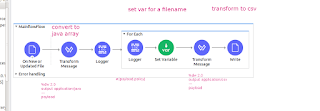
Mulesoft setting up foreach with random file generation

Image
First of all creation flow with the following component. In the file write, confgure the following fx or dw codes :- 

Grafana UI component code

You can find the component code for Grafana UI like Graph, Alert, color picker in the following url. https://github.com/grafana/grafana/tree/master/packages/grafana-ui/src/components

Delete App on Mulesoft Anypoint platform

Image
To delete an app that you created on Mulesoft Anypoint platform, go to Design center and you will see a list of application / api specification that is available. Click on yellow box area and then click on 'red' colored box to remove it.

Installing and setting up telegraf to monitor docker as a service on Linux

Telegraf is a data  collection and aggregation agent that needs to be installed on target server. Let's say you would like to gather metric data for example cpu usage or memory usage for Server A, install Telegraf on server A. All these day will be sent to a central influxdb datastorem, lets call our influxdb ServerDatastore. Grafana and influxdb can live on the same or separate server. In this setup, we are going to setup telegraf to monitor docker application and send all the metric of interest to ServerDataStore.  Installing telegraf on target server curl ttps://dl.influxdata.com/telegraf/releases/telegraf_1.13.2-1_amd64.deb --output telegraf.deb Placing telegraf executable in a specific folder. After extracting our telegraf.deb, you can move the binary to /usr/local/bin folder and configuration file to /user/local/etc/telegraf/telegraf.conf Next we need to specify what metrics we would like telegraf to send over.    Example b...
Setting up system monitoring using grafana, influxdb and telegraf

Image
Introduction There are so many options available for log aggregation and monitoring your system. In this section we are going to look at tech stack called telegraf, influxdb and grafana. Telegraf is a log / metric collection and aggregation agent. It is the component which sits on target machine (your target host where your mission critical applications sits) and continuously send metrics data to your other component called influxdb. InfluxDb is a time-series database that telegraf writes metrics to and typically where all your data is stored. It is like any other database, where you can use a client (influxb) to connect to it and start writing queries and pull out the information relevant to you. Grafana is a front end web applications written using react that shows all your metric information. All you need to do is select your database, write up some query and pick your widget. Setting up on a Windows environment.  Now that we are acquinted with the tool. Lets...

telegraf - running as a daemon

By default, telegraf comes as a tar/zip file which are not installed into a specific folder. As part the linux way of doing things, packages are placed in /user/local folder. I needed to configure telegraf as my daemon. So i used the following conf and place it under /etc/systemd/system [Unit] Description=telegraf.servicee [Service] ExecStart=/usr/local/bin/telegraf --config /usr/local/etc/telegraf/telegraf.conf [Install] WantedBy=multi-user.target: To reload and re-run all the daemon.  sudo systemctl daemon-reload To start a single service  systemctl start telegraf.service To stop the status  systemctl status telegraf.service To get the status  systemctl status telegraf.service

How to quickly test if a Azure Blob storage Blob sas key works

Try to update a file called "alerting.jpg" to a blob container. Then get the full path of the blob file. For example it could be :- https://mystorage.blob.core.windows.net/batch/alerting.jpg then append your sas key to the this uri. https://devsapmtgdsdataextracts.blob.core.windows.net/batch/alerting.jpg?sv=2017-07-29&ss=b&srt=sco&sp=rl&se=2099-12-31&st=2018-03-21&spr=https,http&sig= someweirdkey And once you combined it, just paste it into your browser. You should be able to access  and load the file if your SAS key is legit.

Azure App Configuration : practical guide

Image
Create a non https mvc dotnet core project. dotnet new mvc --no-https Sample csproj configuration. Dotnet core will throw you missing Configuration Error, if you include some packages that are not suppose to be in. If you're doing it from nuget package manager, please ensure you checked "Include Pre-release" dotnet add package Microsoft.Azure.AppConfiguration.AspNetCore --version 3.0.0 -preview- 010560002 - 1165 You need to create a ConnectionString:Appconfig in your app settings. In actual deployment it looks like this The value should be something like this (just copy connection string value)  :- Endpoint=https://your-awesome-appconfig.azconfig.io;Id=fake_id;Secret=fakesecret Let's wire up your view to actually pull data from Application Configuration You need to grab some configuration data from the store and show it like this Our application configuration's Configuration Explorer contains the followi...

dotnet create angular project without https

To do that, use the following command :- dotnet new angular -o belair_app --no-https

The project 'Web' must provide a value for Configuration” error after migrating to .NET Core 3

To fix this :- If it is in .net 3.0, remove all these "Microsoft.AspNetCore.Mvc" Version = "2.2.0" "Microsoft.AspNetCore.Mvc.Razor.ViewCompilation" Version = "2.2.0" And make it look like this below :-

dotnet cli for angular project

Quick and easy way to set you up :) Run the following from the command line :- dotnet new angular -o my-new-app Setting up server side export ASPNETCORE_Environment=Development dotnet build dotnet run Setting up client side npm install --save ng serve Direct docs is availabe from here  

Encrypting and decrpyting using Azure KeyVault with KEY RSA

Let's say you created Azure Key Vault and created a KEY (not secret or certificate) that is made up of RSA Key. The following codes can be used to encrpyt and decrpyt value.

Powershell : creating your PEM on DevOps pipeline

Sometimes you might want to create expose your public key / generate your public key to 3rd party apps. This is a code written entirely on Powershell to help you export public key (modulus and exponent) to a legit PEM file: To use it, $pemPublicKey  = GeneratePublicKey  $your_modulus_base64encoded   $your_exponent Write-Host ( $pemPublicKey )

How C# / Netcore would like to use PEM file (Public side of things)

Publicc key are typically stored in a PEM file which contains modulus and exponent value. These get converted into RSAParameters so that it can be used by RSA to do its magic. It looks something lke this :- General Idea  var rsa = new RSACryptoServiceProvider(); rsa.ImportParameters(p); To use a nuget package called PemUtil.  This allows you to read a PEM file into a RSAParameters. Go and install a nuget package called PemUtil and then you can use the following code. Then you can plug it into code above.  public static RSAParameters ReadPEMFileB(string PemFilePath)         {             RSAParameters rsaParameters;             using (var stream = File.OpenRead(PemFilePath))             using (var reader = new PemReader(stream))             {                 rsaPar...

RSA Public Key PEM File

What is this? A PEM file which contains your public key.  Public key will contain your Modulus and Exponent. (P and Q).  It is different from private key which contains alot more information. -----BEGIN PUBLIC KEY----- MIGfMA0GCSqGSIb3DQEBAQUAA4GNADCBiQKBgQCxSxqCESCdpeXWCprQGMrpwlEg 91EF4Qt1R247gTGaUMgEjFEq9c/UffmtYyccmoIq3n8m/ZcsiCNJNFfGx5h/YEdR ZyzQjSLg9zt3zu5JbBNx4zb63vvhpCGoMf65y/RvMs+XjSBl8ybl0vbbrC62YH1I 7ZJYSbKhXr3ILHyUSwIDAQAB -----END PUBLIC KEY----- OpenSSL To generate a rsa key openssl genrsa -out private.pem 1024 To view your private key openssl pkey -in private.pem -text To generate a public key (your private key already contain your public key) openssl pkey -in private.pem -out public.pem -pubout View our public key (noticed the additional -pubin argument) openssl pkey -in public.pem -pubin -text

ModuleNotFoundError: No module named 'transforms.data.processors.squad'

If you encounter this issue, this is because the latest code base is not package to pypi for some reason. So i use a rather hacky way to resolve this. If you're running on your computer Clone  https://github.com/huggingface/transformers  and locate your installed python package for "transformer". It should be somewhere usr/lib/python/dist-packages. Replace all code in the dist-package transfomer folder with your clone folder. Yes, replace all as there are alot of dependencies. :( Using colab. This is almost the same, clone the repository and start upload to the destination folder. Loads of work and hope you have fun. To be honest, i didn't get it to do those hard core training. It just stall after a few runs.

OpenAI GPT2 - Generating your first content

Perhaps the best way to get started is to look at this Colab notebook. Just run it and you will see loads of fake content being generated. https://colab.research.google.com/drive/1OqF99q0-G1RCfmvcEw_qZvjuiJL_066Q#scrollTo=TsNXf-0zgaHn

Azure function weird way of setting up logger

No really sure why we need to specify a type for creating / initializing logger (as indicated by code below)