Posts

hothoc - calling REST API endpoint troubleshooting

If you're getting the following error messages :-  "Could not deserialize the response body stream as System.Collections.Generic.ICollection`1[[TodoReader.WeatherForecast]' Or  "Unable to resolve service for type 'System.String' while attempting to activate service" These are indications that the conversion issue from JSON after calling the endpoint is not working. To troubleshoot this - NSWAG typically generate code that hides the actual error. You have to do some debugging and find out which type wasn't really being serialized successfully.  Or  "No service for type 'System.Net.Http.IHttpClientFactory' has been registered." This means you haven't register IHttpClientFactory to your service.

using NSwag console to generate code from OpenAPI endpoint

  To generate code from an Open API endpoint, you can use the nswag cli. The following are easy steps to do the code generations. The source here is swagger.json.  The /classname is the name of your class that will be generated and the same applies to  /namespace and  /output dotnet new tool-manifest dotnet tool install NSwag.ConsoleCore --version 13.10.9 curl -o swagger.json http://localhost:5199/swagger/v1/swagger.json dotnet nswag swagger2csclient /input:swagger.json /classname:PartnerService /namespace:ExternalAPI /output:PartnerService.cs For more options, please refer to this link here https://github.com/RicoSuter/NSwag/wiki/CommandLine/ce950c5aea7bf52a85ec6e517ad8ea96762181ed

install codegpt to vscode

Image
To install Codegpt to your vscode, first open up your vscode, then goto extension.  Then look for "CodeGpt" (the one with 1 million download) Install that extension.  Once you've done that, goto View -> Open View -> CodeGpt.  Ask away!   

hotchoc - graphql - getting started

  Create a dotnet core api project using cli. I am using dotnet 8. dotnet new webapi -n app  Then add the hotchoc packages  dotnet add package HotChocolate.AspNetCore Then you can add the necessary code to Program.cs  using HotChocolate ; using HotChocolate . AspNetCore ; var builder = WebApplication . CreateBuilder ( args ); builder . AddGraphQLServer ()     . AddQueryType < Query >(); var app = builder . Build (); app . MapGet ( "/" , () => "Hello World!" ); app . Run (); AddQueryType<Query> - this query is a class that contain simple code here. namespace app . model {     public class Query     {         public Book GetBook () =>         new Book         {             Title = "C# in depth." ,             Author = new Author             {   ...

Mr Parker - terraform plan - complaining missing realm and openid client scope resources for Mr Parker provider

 When there's missing client especially when you restore a database and then run the pipeline, you will get this error - This has been fixed in a more recent version of the provider. A June 2023 version of the provider should work.  The only way to resolve this, assuming you're like me - unable to update, is the initialize your terraform and then run terraform state rm to remove the states accordingly. Please note, this would result in re-creation of the scopes or whatever resources that you're planning to remove.  Example command:  terraform state rm module.your_organization. keycloak_openid_client_ default_scopes.client_mobile_ edr_default_scopes

PSQL command to help with session termination

I find the following PSQL command quite useful for terminating session for a specific database in Postgres. Let say you want to alter the database name but there's tons of connections.  ALTER DATABASE "keycloak" RENAME TO "keycloakcurrent" So first you see which process is active in the database  SELECT * FROM pg_stat_activity where datname='keycloak' Then you issue multiple command to terminate the session.  SELECT pg_terminate_backend(9026) If you bump into an error whereby you need to be a member of pg_signal_backend, then you can use this command to grant yourself a member to that role called pg_signal_backend. GRANT pg_signal_backend TO psqladmin

container images - distroless vs chiseled

  Distroless Images  Think of Distroless Docker images as minimalists when it comes to traditional Docker images. They cut out all the extras and focus solely on the bare necessities your application needs to run. This means you won't find the usual operating system tools or shells inside. While they aren't entirely OS-free, they only pack the essential components needed for the operating system to function at its most basic level. Chiseled Images Traditional container images are bloated with unnecessary components, hindering performance and security. Chiseled containers address this by including only the essentials, leading to significant size and security improvements. Cons:  Limited container images for dotnet and java.

kubecon and kubecon euro 2024

Time to get excited again   https://www.youtube.com/watch?v=1u5LtsJqyrA&list=PLj6h78yzYM2N8nw1YcqqKveySH6_0VnI0

dapr getting started

Image
To get started running your dapr app, you need to install locally by running. This is to install dapr locally on my machine. It is different from initializing dapr in your kubernetes cluster as shown in the following steps. dapr init Then, to install dapr in a kubernetes environment  dapr init -k Then fire up the dashboard using  dapr dashboard -k And then you can spin up app that interacts with dapr by running,  dapr run --app-id myapp --dapr-http-port 3500 If you can get the app running and shows output as shown here, then dapr generic component is available.  And then get started with this example here https://github.com/dapr/quickstarts/tree/master/tutorials/hello-kubernetes

kubevela - the server could not find the requested resource (post definitionrevisions.core.oam.dev)

If you try to install kubevela on k1.29, you would get error. The reason for this is kubevela is only supported in v1.19 to v1.26.  https://github.com/kubevela/kubevela/issues/6497 I have tried using vela cli and helm approach - it is still failing for me.  Currently, the issue above is open and hopefully get fixed at some point.  

aws cloudformation - good introductory material

 https://catalog.workshops.aws/cfn101/en-US/basics

keycloak client secret rotation

Image
 Client secret rotation is disabled by default but you can turn it on with the following command:- docker run --name mykeycloak -v c:\work\keycloak\conf:/opt/keycloak/conf -p 5000:8080 -e KEYCLOAK_ADMIN=admin -e KC_METRICS_ENABLED=true -e  KC_FEATURES= client-secret-rotation  -e KC_HEALTH_ENABLED=true -e KEYCLOAK_ADMIN_PASSWORD=admin quay.io/keycloak/keycloak start-dev -cache-config-file=cache.xml Next is about configuring your keycloak. Goto Realm Settings -> Client Policies -> Profile.  Everything you need to do will be in this page. So we will  1. Create profile (Profiles tab) 2. Create policies (Policies tab)  Now that we have our bearing right, go ahead create a Profile by clicking on "Create client profile" and that brings you to a new page. Provide a name and click "Save". Next you will see a screen below - click on "Add Executor". Then choose "secret-rotation" Configure your secret rotation configuration and then click 'Save...

AADSTS90061: Request to External OIDC endpoint failed.

 This error often comes up and if you google it, you will hit this page. https://azure.github.io/azure-workload-identity/docs/troubleshooting.html#aadsts90061-request-to-external-oidc-endpoint-failed To give an idea what the error message means, " the OIDC issuer endpoint is not exposed to the internet or is inaccessible "" - This simply means Microsoft Azure AD is trying to hit the endpoint you've provided in the issuer section.  So it is not just a static value that you provided in your federated credential and provided the necessary field in your JWT.  The endpoint will be access and jwks key checked against the token you have provided.  SERVICE_ACCOUNT_ISSUER - is the issuer endpoint you specified/provided in your JWT. This must be publicly accessible along with the following endpoint curl ${SERVICE_ACCOUNT_ISSUER} /.well-known/openid-configuration curl ${SERVICE_ACCOUNT_ISSUER} /openid/v1/jwks

azure servie bus - quick way to get your metrics

  Goto your service bus -> Workbook -> Select the request tab -> You can see server errors, throttling without doing much clicking.  

auth0 - terraforming your client with Auth0 terraform provider

 You can terraform your client and their configurations. please check out  https://github.com/auth0/terraform-provider-auth0?tab=readme-ov-file

auth0 - how to revoke offline token for a user

Goto Dashboard -> User -> Select your the user and under Devices ->  Unlink the token tied to your client 

postman - exchanging token using refresh token example

Image
  It is quite common to exchange for a new set of token with new expiry times in an oauth application. You typically need the following setup as shown here. Before you can do this, you must have logged in gotten your 1st set of access token / refresh token - and it has scope to offline_access. Then in the POST endpoint below (first red rectangle) - provide your token endpoint.  Then provide the setup shown below:  You should get a new sets of token  I guess altho client in auth0 are protected with a secret - I can get away without providing client_secret.  Altho for the record, i did setup the client as a SPA application which is an open client and can't hold password.  If you prefer the curl  curl --location 'YOUR-TOKEN-ENDPOINT' \ --header 'Content-Type: application/x-www-form-urlencoded' \ --header 'Authorization: Bearer YOUR-ACCESS-TOKEN' \ --header 'Cookie: did=s%3Av0%3A699f7290-f0b8-11ee-b580-9d803a0bd79c.3XA2ahamJPcJWt7b35fbqtFq%2FqoXEKWSHGigUkA...

auth0 - getting access token / refresh token in your jwt using react-sdk

Image
  To get your refresh_token from auth0 - we need just need to provide a offline_access scope for react sdk as shown in the code below:- import { Auth0Provider } from '@auth0/auth0-react' ; const root = ReactDOM . createRoot (   document . getElementById ( 'root' ) as HTMLElement   );   root . render (     < React.StrictMode >         < Auth0Provider         domain = "your-domain.auth0.com"         clientId = "your-client-id"         authorizationParams = { {           redirect_uri : window . location . origin ,           audience : "https://your-api-identifier" ,           scope : "offline_access"         } }         >           < App />         </ Auth0Provider >     </ Rea...

istio - debugging route for postgres that resolve to kubernetes external name service

Bump into an issue where we found out outgoing port for postgres 5432 are forwarded to a k8s external name service.  It wasn't clear to us as this service resides in another namespace. To troubleshoot, how istio do the routing I use  istioctl ps listerners <pod-name> -n your-nanespace  Sure enough detected that: 0.0.0.0    ALL  5432 ---> External-serviceName.Other-Namespace.svc.kubernetes.local  So how do you ensure istio route these to the right postgres instance in Azure or AWS, You need a serviceEntry .  apiVersion : networking.istio.io/v1beta1 kind : ServiceEntry metadata :   name : external-svc-postgres   namespace : my-namespace spec :   hosts :   - mypostgress.database.azure.com   exportTo :   - "."   # Ensure this is not available to other namespace.   location : MESH_EXTERNAL   ports :   - number : 5432     name : mypostgres     protocol : TCP   resoluti...

auth0 changing the token expiry_in timings

Image
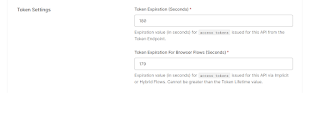
  In auth0 you can configure different expiry time for your token. To get a token, your say react sdk would call an API endpoint in your domain. This API is what you configure under Applications -> APIs.  Each API can have a different expiry timings and you just need to make sure you call the right API with the right expiry settings.  For example, in the code snippet below, I am calling my API with a unique identifier below Given that it has a expiry of 180 seconds, the token return would have the same expiry time too.   try {         const accessToken = await getAccessTokenSilently ({           authorizationParams : {             audience : `https://myend` ,             scope : "read:current_user" ,           },         }); My API expiry time configuration